> ## Documentation Index
> Fetch the complete documentation index at: https://docs-staging-docs-event-stream-action-templates.mintlify.site/llms.txt
> Use this file to discover all available pages before exploring further.

> Learn how to configure your JWT Connection to sign, verify or decode JSON Web Tokens.

# JWT Vault Connection

## Configure your JWT Vault connection

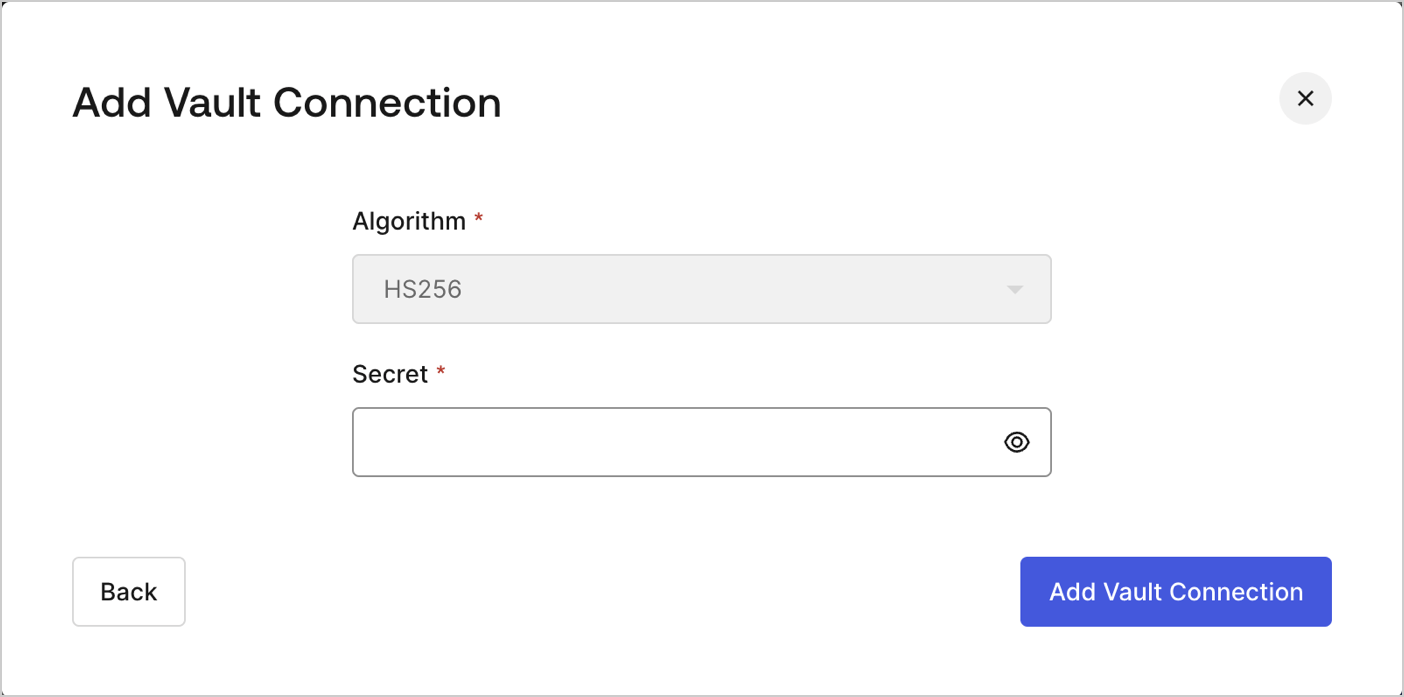
To configure an JWT Vault Connection for your Flows JWT Actions to sign, decode, and verify JSON Web Tokens, you need to set the required parameters.
<Frame>
  <img src="https://mintcdn.com/docs-staging-docs-event-stream-action-templates/dXzfzKhc8v6GUPhU/docs/images/customize/forms/vaults/jwt-vault-connection.png?fit=max&auto=format&n=dXzfzKhc8v6GUPhU&q=85&s=9eb2f8e3927e4f0177308bbb0fcfda0f" alt="Dashboard > Actions > Forms > Vault > JWT" data-og-width="1404" width="1404" data-og-height="697" height="697" data-path="docs/images/customize/forms/vaults/jwt-vault-connection.png" data-optimize="true" data-opv="3" srcset="https://mintcdn.com/docs-staging-docs-event-stream-action-templates/dXzfzKhc8v6GUPhU/docs/images/customize/forms/vaults/jwt-vault-connection.png?w=280&fit=max&auto=format&n=dXzfzKhc8v6GUPhU&q=85&s=3a438436bb8aa079a77a41191b830c33 280w, https://mintcdn.com/docs-staging-docs-event-stream-action-templates/dXzfzKhc8v6GUPhU/docs/images/customize/forms/vaults/jwt-vault-connection.png?w=560&fit=max&auto=format&n=dXzfzKhc8v6GUPhU&q=85&s=09cc661651e81cc2bb71177a02b29cb3 560w, https://mintcdn.com/docs-staging-docs-event-stream-action-templates/dXzfzKhc8v6GUPhU/docs/images/customize/forms/vaults/jwt-vault-connection.png?w=840&fit=max&auto=format&n=dXzfzKhc8v6GUPhU&q=85&s=e2b8d4caba307362f2f8c10e2f46059a 840w, https://mintcdn.com/docs-staging-docs-event-stream-action-templates/dXzfzKhc8v6GUPhU/docs/images/customize/forms/vaults/jwt-vault-connection.png?w=1100&fit=max&auto=format&n=dXzfzKhc8v6GUPhU&q=85&s=dd3c2da08601cda0318add1d12bdae8b 1100w, https://mintcdn.com/docs-staging-docs-event-stream-action-templates/dXzfzKhc8v6GUPhU/docs/images/customize/forms/vaults/jwt-vault-connection.png?w=1650&fit=max&auto=format&n=dXzfzKhc8v6GUPhU&q=85&s=1c82b0081283d9aced47efad26d2ffc3 1650w, https://mintcdn.com/docs-staging-docs-event-stream-action-templates/dXzfzKhc8v6GUPhU/docs/images/customize/forms/vaults/jwt-vault-connection.png?w=2500&fit=max&auto=format&n=dXzfzKhc8v6GUPhU&q=85&s=980d10348eb59b019ad4940d13df971f 2500w" />
</Frame>

## Input settings

| Parameter | Description                                                 |
| --------- | ----------------------------------------------------------- |
| Secret    | Secret to be used in the HS256 algorithm to encode the JWT. |
