> ## Documentation Index
> Fetch the complete documentation index at: https://docs-staging-docs-event-stream-action-templates.mintlify.site/llms.txt
> Use this file to discover all available pages before exploring further.

> Configure an update policy form using Forms for Actions

# Use Cases: Configure an update policy form using Forms

<Card title="Before you start">
  1. Create a [Machine-to-Machine Application](/docs/get-started/auth0-overview/create-applications/machine-to-machine-apps) with the following scopes enabled:

  * `read:users`
  * `update:users`
  * `create:users`
  * `read:users_app_metadata`
  * `update:users_app_metadata`
  * `create:users_app_metadata`

  2. Add a [Vault connection](/docs/customize/forms/vault) using the M2M application credentials.
</Card>

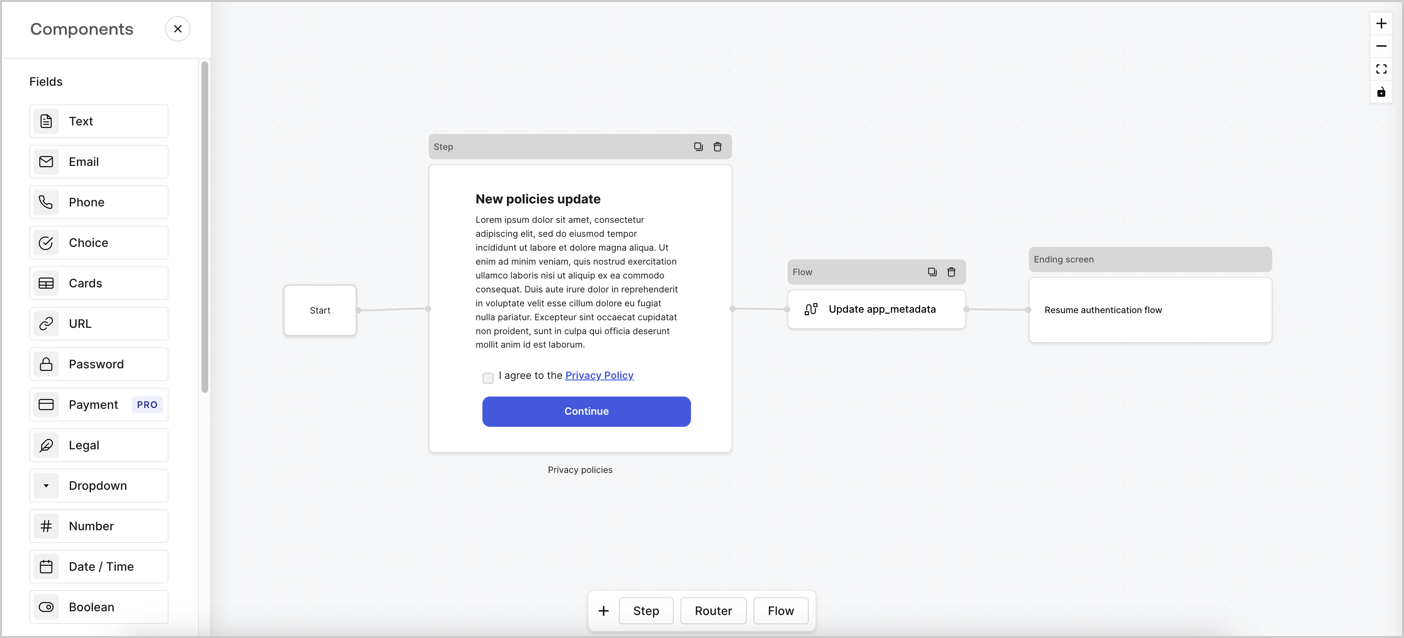
Forms for Actions allows you to create custom privacy policies flows and store the consent under the `app_metadata` object.
<Frame>
  <img src="https://mintcdn.com/docs-staging-docs-event-stream-action-templates/1eoiXqB-LRUz0klM/docs/images/cdy7uua7fh8z/6i68dMvHDTijfRmSgN1x8Q/ad900e7d4c0fb34645921435472b8684/privavy-policy-form.png?fit=max&auto=format&n=1eoiXqB-LRUz0klM&q=85&s=565e5f3dff2712d82eecc5ef070ccafe" alt="Dashboard > Actions > Forms > Privacy policy use case" data-og-width="1404" width="1404" data-og-height="638" height="638" data-path="docs/images/cdy7uua7fh8z/6i68dMvHDTijfRmSgN1x8Q/ad900e7d4c0fb34645921435472b8684/privavy-policy-form.png" data-optimize="true" data-opv="3" srcset="https://mintcdn.com/docs-staging-docs-event-stream-action-templates/1eoiXqB-LRUz0klM/docs/images/cdy7uua7fh8z/6i68dMvHDTijfRmSgN1x8Q/ad900e7d4c0fb34645921435472b8684/privavy-policy-form.png?w=280&fit=max&auto=format&n=1eoiXqB-LRUz0klM&q=85&s=acac0a35abf5c5136a8110baefe90b73 280w, https://mintcdn.com/docs-staging-docs-event-stream-action-templates/1eoiXqB-LRUz0klM/docs/images/cdy7uua7fh8z/6i68dMvHDTijfRmSgN1x8Q/ad900e7d4c0fb34645921435472b8684/privavy-policy-form.png?w=560&fit=max&auto=format&n=1eoiXqB-LRUz0klM&q=85&s=3638523e23589b2d100a977999ea8382 560w, https://mintcdn.com/docs-staging-docs-event-stream-action-templates/1eoiXqB-LRUz0klM/docs/images/cdy7uua7fh8z/6i68dMvHDTijfRmSgN1x8Q/ad900e7d4c0fb34645921435472b8684/privavy-policy-form.png?w=840&fit=max&auto=format&n=1eoiXqB-LRUz0klM&q=85&s=2d95eb00b706e507adb83d5f569c976b 840w, https://mintcdn.com/docs-staging-docs-event-stream-action-templates/1eoiXqB-LRUz0klM/docs/images/cdy7uua7fh8z/6i68dMvHDTijfRmSgN1x8Q/ad900e7d4c0fb34645921435472b8684/privavy-policy-form.png?w=1100&fit=max&auto=format&n=1eoiXqB-LRUz0klM&q=85&s=105e038abede7e4c1f2f023d6a8e007a 1100w, https://mintcdn.com/docs-staging-docs-event-stream-action-templates/1eoiXqB-LRUz0klM/docs/images/cdy7uua7fh8z/6i68dMvHDTijfRmSgN1x8Q/ad900e7d4c0fb34645921435472b8684/privavy-policy-form.png?w=1650&fit=max&auto=format&n=1eoiXqB-LRUz0klM&q=85&s=9ca03c81bd41ad0a0782b561399e4208 1650w, https://mintcdn.com/docs-staging-docs-event-stream-action-templates/1eoiXqB-LRUz0klM/docs/images/cdy7uua7fh8z/6i68dMvHDTijfRmSgN1x8Q/ad900e7d4c0fb34645921435472b8684/privavy-policy-form.png?w=2500&fit=max&auto=format&n=1eoiXqB-LRUz0klM&q=85&s=f08159f6a756bf429f2301ef372430cf 2500w" />
</Frame>

The sections below outline how you can create an Update Policy form using nodes and flows, along with steps for adding your form to a [Post Login](/docs/customize/actions/explore-triggers/signup-and-login-triggers/login-trigger) Action.

## Create a form from scratch

Follow these steps to create a form to gather information:

1. Open the Form editor by selecting **Auth0 Dashboard > Actions > Forms.**
2. Select **Create Form** > **Start from scratch**.

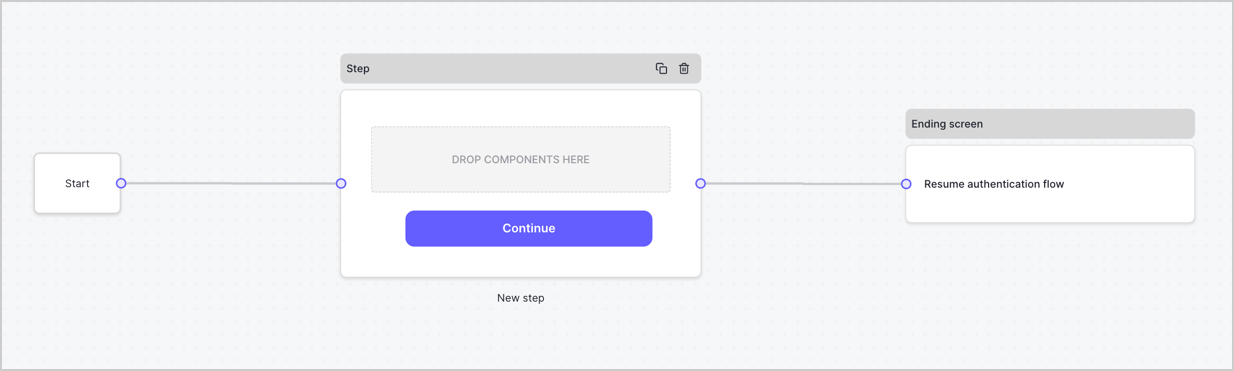
By default, a new form contains a Start node, a Step node, and an Ending screen node.
<Frame>
  <img src="https://mintcdn.com/docs-staging-docs-event-stream-action-templates/vucH_5_6S2dsLDJj/docs/images/cdy7uua7fh8z/2TZ9jSjgEcARFpULI6hz4R/a4319a1bd482f2ee5cc23100fdb2f42c/New-form-Forms-for-action-use-case.png?fit=max&auto=format&n=vucH_5_6S2dsLDJj&q=85&s=8c6e7ecb4d28181a486b9e244c976fc6" alt="Dashboard > Forms > Use Cases > Form" data-og-width="1234" width="1234" data-og-height="371" height="371" data-path="docs/images/cdy7uua7fh8z/2TZ9jSjgEcARFpULI6hz4R/a4319a1bd482f2ee5cc23100fdb2f42c/New-form-Forms-for-action-use-case.png" data-optimize="true" data-opv="3" srcset="https://mintcdn.com/docs-staging-docs-event-stream-action-templates/vucH_5_6S2dsLDJj/docs/images/cdy7uua7fh8z/2TZ9jSjgEcARFpULI6hz4R/a4319a1bd482f2ee5cc23100fdb2f42c/New-form-Forms-for-action-use-case.png?w=280&fit=max&auto=format&n=vucH_5_6S2dsLDJj&q=85&s=f55633372b236ee7eeab246ed5d2814f 280w, https://mintcdn.com/docs-staging-docs-event-stream-action-templates/vucH_5_6S2dsLDJj/docs/images/cdy7uua7fh8z/2TZ9jSjgEcARFpULI6hz4R/a4319a1bd482f2ee5cc23100fdb2f42c/New-form-Forms-for-action-use-case.png?w=560&fit=max&auto=format&n=vucH_5_6S2dsLDJj&q=85&s=4b2846d0298efbe21b3d6712e6bb56a7 560w, https://mintcdn.com/docs-staging-docs-event-stream-action-templates/vucH_5_6S2dsLDJj/docs/images/cdy7uua7fh8z/2TZ9jSjgEcARFpULI6hz4R/a4319a1bd482f2ee5cc23100fdb2f42c/New-form-Forms-for-action-use-case.png?w=840&fit=max&auto=format&n=vucH_5_6S2dsLDJj&q=85&s=7977d5dc9bcc5a14a8cac556ba8530ba 840w, https://mintcdn.com/docs-staging-docs-event-stream-action-templates/vucH_5_6S2dsLDJj/docs/images/cdy7uua7fh8z/2TZ9jSjgEcARFpULI6hz4R/a4319a1bd482f2ee5cc23100fdb2f42c/New-form-Forms-for-action-use-case.png?w=1100&fit=max&auto=format&n=vucH_5_6S2dsLDJj&q=85&s=8452bdd7bb99faf83bf39a7d5ef5c658 1100w, https://mintcdn.com/docs-staging-docs-event-stream-action-templates/vucH_5_6S2dsLDJj/docs/images/cdy7uua7fh8z/2TZ9jSjgEcARFpULI6hz4R/a4319a1bd482f2ee5cc23100fdb2f42c/New-form-Forms-for-action-use-case.png?w=1650&fit=max&auto=format&n=vucH_5_6S2dsLDJj&q=85&s=88e373596021b9d966f505845f6b2405 1650w, https://mintcdn.com/docs-staging-docs-event-stream-action-templates/vucH_5_6S2dsLDJj/docs/images/cdy7uua7fh8z/2TZ9jSjgEcARFpULI6hz4R/a4319a1bd482f2ee5cc23100fdb2f42c/New-form-Forms-for-action-use-case.png?w=2500&fit=max&auto=format&n=vucH_5_6S2dsLDJj&q=85&s=c8436a4213f3efe34e8c247bab9c00ae 2500w" />
</Frame>

### Configure the Step node

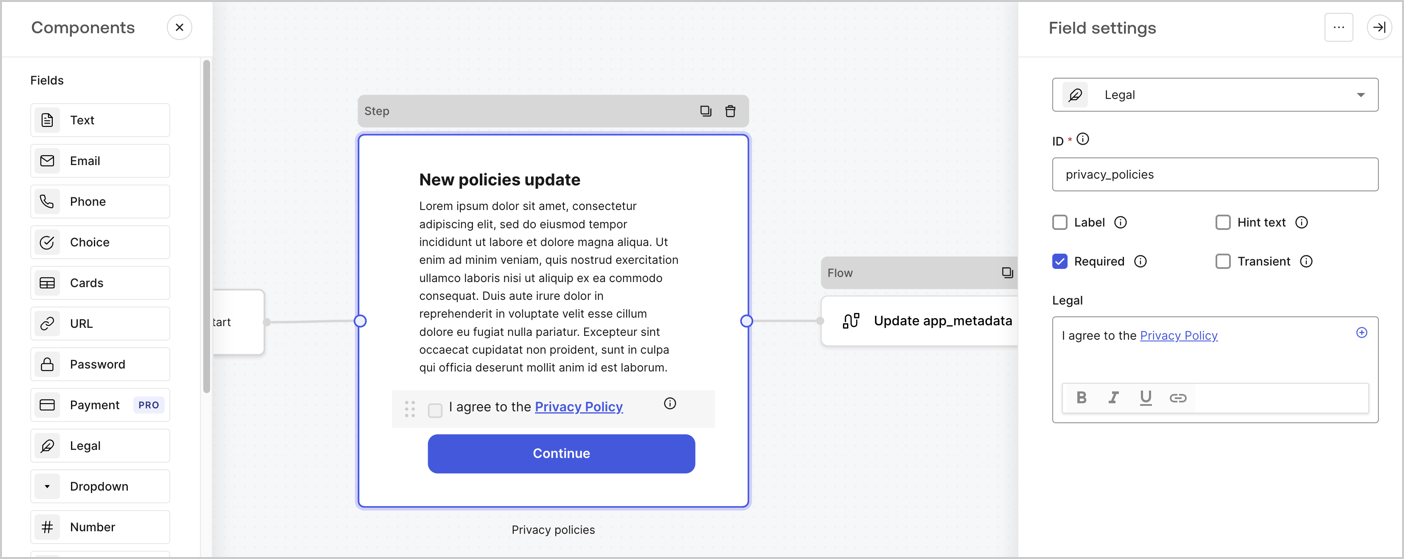
The Step node is the graphical interface visible to users. Add [Fields](/docs/customize/forms/nodes-and-components) to the Step node to collect the new agreement acceptance value by following these steps:

1. Drag a **Rich text** field from the **Components menu** into the **Step** node.

   * **Rich text**: Enter a description of your privacy policies updates.
   * Select **Save**.
2. Drag a **Legal** field into the **Step** node.

   * **ID**: Enter `privacy_policies`.
   * **Required**: Enable the checkbox.
   * **Legal**: Enter `I agree to the Privacy Policy`.
   * Select **Save**.
3. Select **Publish** to save.
<Frame>
  <img src="https://mintcdn.com/docs-staging-docs-event-stream-action-templates/SfAMet_KrWFk9wC4/docs/images/cdy7uua7fh8z/59zFFjQjAnjogkc2QGIqqJ/0ad66b1b636544122aa4e65968b76c2c/privacy-policy-step-node.png?fit=max&auto=format&n=SfAMet_KrWFk9wC4&q=85&s=33689a46c99f82880baa9d417dc67238" alt="Dashboard > Actions > Forms > Use case privacy policy step node" data-og-width="1404" width="1404" data-og-height="559" height="559" data-path="docs/images/cdy7uua7fh8z/59zFFjQjAnjogkc2QGIqqJ/0ad66b1b636544122aa4e65968b76c2c/privacy-policy-step-node.png" data-optimize="true" data-opv="3" srcset="https://mintcdn.com/docs-staging-docs-event-stream-action-templates/SfAMet_KrWFk9wC4/docs/images/cdy7uua7fh8z/59zFFjQjAnjogkc2QGIqqJ/0ad66b1b636544122aa4e65968b76c2c/privacy-policy-step-node.png?w=280&fit=max&auto=format&n=SfAMet_KrWFk9wC4&q=85&s=f08c80d4dc883e16ed5bf776880b9e74 280w, https://mintcdn.com/docs-staging-docs-event-stream-action-templates/SfAMet_KrWFk9wC4/docs/images/cdy7uua7fh8z/59zFFjQjAnjogkc2QGIqqJ/0ad66b1b636544122aa4e65968b76c2c/privacy-policy-step-node.png?w=560&fit=max&auto=format&n=SfAMet_KrWFk9wC4&q=85&s=46eccacb50e618ae0985c5035ba19c4f 560w, https://mintcdn.com/docs-staging-docs-event-stream-action-templates/SfAMet_KrWFk9wC4/docs/images/cdy7uua7fh8z/59zFFjQjAnjogkc2QGIqqJ/0ad66b1b636544122aa4e65968b76c2c/privacy-policy-step-node.png?w=840&fit=max&auto=format&n=SfAMet_KrWFk9wC4&q=85&s=e7b482df7acbb13caa13902147a006fd 840w, https://mintcdn.com/docs-staging-docs-event-stream-action-templates/SfAMet_KrWFk9wC4/docs/images/cdy7uua7fh8z/59zFFjQjAnjogkc2QGIqqJ/0ad66b1b636544122aa4e65968b76c2c/privacy-policy-step-node.png?w=1100&fit=max&auto=format&n=SfAMet_KrWFk9wC4&q=85&s=a1b4a9535ca74f39ad1dd7083722c25d 1100w, https://mintcdn.com/docs-staging-docs-event-stream-action-templates/SfAMet_KrWFk9wC4/docs/images/cdy7uua7fh8z/59zFFjQjAnjogkc2QGIqqJ/0ad66b1b636544122aa4e65968b76c2c/privacy-policy-step-node.png?w=1650&fit=max&auto=format&n=SfAMet_KrWFk9wC4&q=85&s=f4cd3c3ad594950362516c40bff632e6 1650w, https://mintcdn.com/docs-staging-docs-event-stream-action-templates/SfAMet_KrWFk9wC4/docs/images/cdy7uua7fh8z/59zFFjQjAnjogkc2QGIqqJ/0ad66b1b636544122aa4e65968b76c2c/privacy-policy-step-node.png?w=2500&fit=max&auto=format&n=SfAMet_KrWFk9wC4&q=85&s=ffd6f80b18311478d90828dbe4599cab 2500w" />
</Frame>

### Configure the Flow node

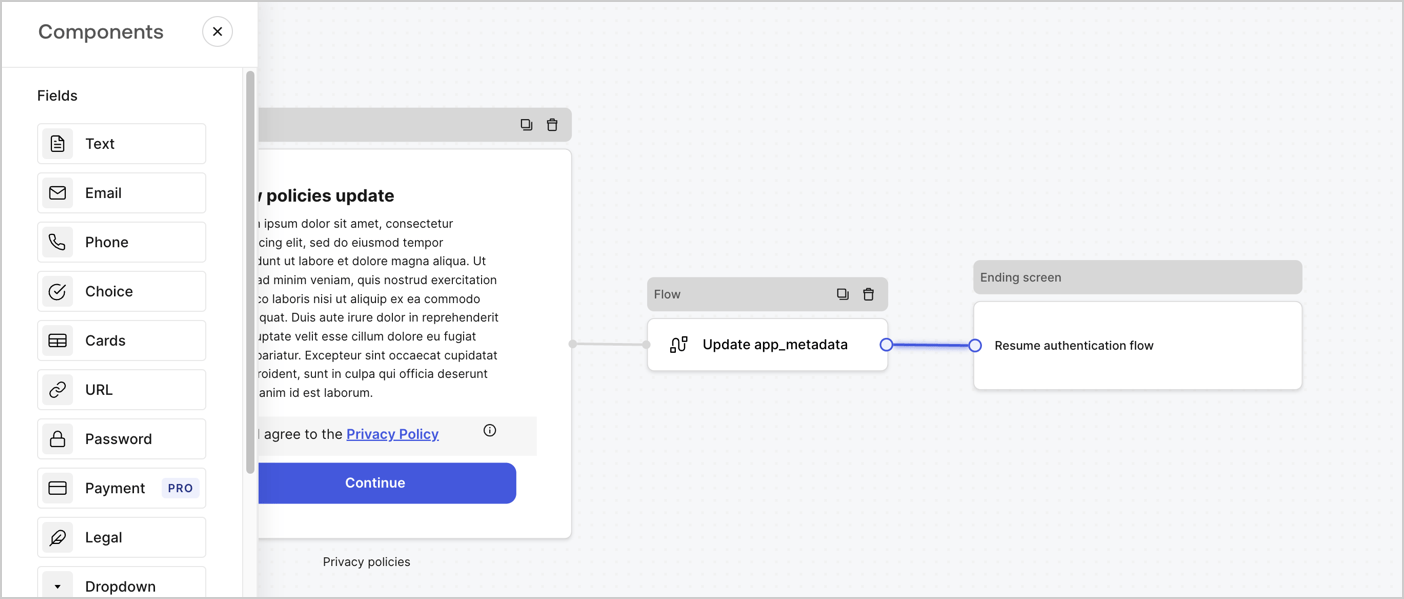
Add a **Flow** node after the **Step** node to update the `app_metadata` and resume the authentication flow by following these steps:

1. Select **Flow** from the bottom of the Form editor.
2. Remove the existing link between the **Step** and **Ending Screen** nodes.
3. Select the new **Flow** > **Click to add a flow** > **Create a new flow.**

   * Enter `Update app_metadata` in the **Name** field.
   * Select **Create**.
   * Select **Save**.
4. Link the **Flow** node to the **Step** and **Ending Screen** nodes as pictured below.
5. Select **Publish** to save.
<Frame>
  <img src="https://mintcdn.com/docs-staging-docs-event-stream-action-templates/1eoiXqB-LRUz0klM/docs/images/cdy7uua7fh8z/6YIkzm7SrpM9LW76AXuRzh/353c518fe82bbaa440836da1d83596d6/link-policies.png?fit=max&auto=format&n=1eoiXqB-LRUz0klM&q=85&s=9a49bd3fa04da84afc21d06e8e327c3e" alt="Dashboard > Actions > Forms > Form" data-og-width="1404" width="1404" data-og-height="599" height="599" data-path="docs/images/cdy7uua7fh8z/6YIkzm7SrpM9LW76AXuRzh/353c518fe82bbaa440836da1d83596d6/link-policies.png" data-optimize="true" data-opv="3" srcset="https://mintcdn.com/docs-staging-docs-event-stream-action-templates/1eoiXqB-LRUz0klM/docs/images/cdy7uua7fh8z/6YIkzm7SrpM9LW76AXuRzh/353c518fe82bbaa440836da1d83596d6/link-policies.png?w=280&fit=max&auto=format&n=1eoiXqB-LRUz0klM&q=85&s=54b1555363fd336ade0e21f8322287ef 280w, https://mintcdn.com/docs-staging-docs-event-stream-action-templates/1eoiXqB-LRUz0klM/docs/images/cdy7uua7fh8z/6YIkzm7SrpM9LW76AXuRzh/353c518fe82bbaa440836da1d83596d6/link-policies.png?w=560&fit=max&auto=format&n=1eoiXqB-LRUz0klM&q=85&s=927b2b55ff95b59b42bd710bbdcb4209 560w, https://mintcdn.com/docs-staging-docs-event-stream-action-templates/1eoiXqB-LRUz0klM/docs/images/cdy7uua7fh8z/6YIkzm7SrpM9LW76AXuRzh/353c518fe82bbaa440836da1d83596d6/link-policies.png?w=840&fit=max&auto=format&n=1eoiXqB-LRUz0klM&q=85&s=03a11af8e02296f5d966c151a8802156 840w, https://mintcdn.com/docs-staging-docs-event-stream-action-templates/1eoiXqB-LRUz0klM/docs/images/cdy7uua7fh8z/6YIkzm7SrpM9LW76AXuRzh/353c518fe82bbaa440836da1d83596d6/link-policies.png?w=1100&fit=max&auto=format&n=1eoiXqB-LRUz0klM&q=85&s=0d99fa3449e142cbc17ad984eaa25102 1100w, https://mintcdn.com/docs-staging-docs-event-stream-action-templates/1eoiXqB-LRUz0klM/docs/images/cdy7uua7fh8z/6YIkzm7SrpM9LW76AXuRzh/353c518fe82bbaa440836da1d83596d6/link-policies.png?w=1650&fit=max&auto=format&n=1eoiXqB-LRUz0klM&q=85&s=06f577da77d5b9e4650be70ec55d513d 1650w, https://mintcdn.com/docs-staging-docs-event-stream-action-templates/1eoiXqB-LRUz0klM/docs/images/cdy7uua7fh8z/6YIkzm7SrpM9LW76AXuRzh/353c518fe82bbaa440836da1d83596d6/link-policies.png?w=2500&fit=max&auto=format&n=1eoiXqB-LRUz0klM&q=85&s=efe7cd5ed7f85fae642b96edf65d8fb8 2500w" />
</Frame>

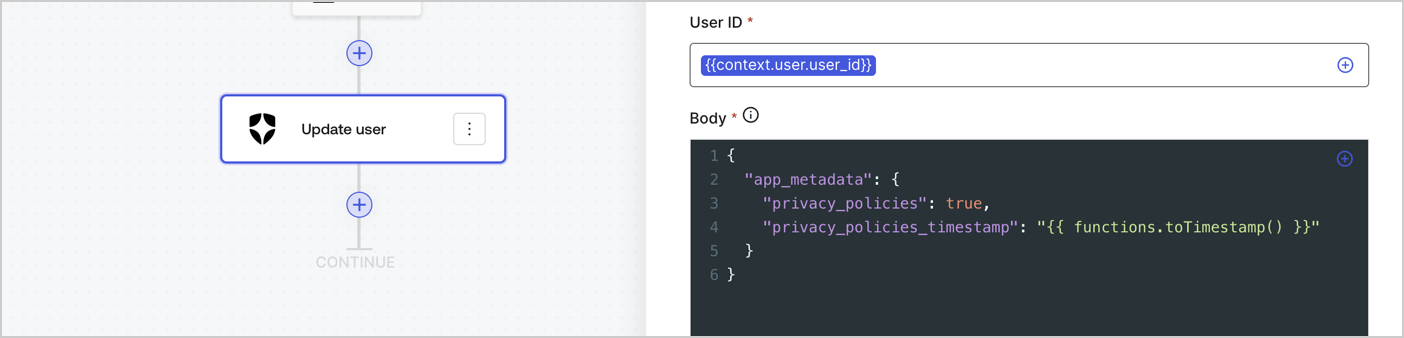
Add an Auth0 Update user action to the flow by following these steps:

1. Select the **Flow** **Update app\_metadata** > **Edit flow** to open the Flow editor in a new tab.
2. Below the StartAction, select the **+** icon to add an **Update user** action. Complete the fields below, then select **Save** to continue.

   * **Connection**: Select from the dropdown the Vault connection to your M2M application.

   * **User ID**: Enter `{{context.user.user_id}}`.

   * **Body**: Copy and paste the following code to update the app\_metadata with the privacy\_policies and privacy\_policies\_timestamp properties.

     ```text lines theme={null}
     {
       "app_metadata": {
         "privacy_policies": true,
         "privacy_policies_timestamp": "{{ functions.toTimestamp() }}"
       }
     }
     ```

   * Select **Save**.
3. Select **Publish** to save.
<Frame>
  <img src="https://mintcdn.com/docs-staging-docs-event-stream-action-templates/IrI_qkmH6rdv_iZp/docs/images/cdy7uua7fh8z/CvMNIwWrOUwaFW4X3G28p/1fb70ae57a20749d9ffaaba8dc0b7e26/update-user-privacy.png?fit=max&auto=format&n=IrI_qkmH6rdv_iZp&q=85&s=37a7c4707aa2a35b6e4c077976f63989" alt="Dashboard > Actions > Forms > User case privacy policy code" data-og-width="1404" width="1404" data-og-height="338" height="338" data-path="docs/images/cdy7uua7fh8z/CvMNIwWrOUwaFW4X3G28p/1fb70ae57a20749d9ffaaba8dc0b7e26/update-user-privacy.png" data-optimize="true" data-opv="3" srcset="https://mintcdn.com/docs-staging-docs-event-stream-action-templates/IrI_qkmH6rdv_iZp/docs/images/cdy7uua7fh8z/CvMNIwWrOUwaFW4X3G28p/1fb70ae57a20749d9ffaaba8dc0b7e26/update-user-privacy.png?w=280&fit=max&auto=format&n=IrI_qkmH6rdv_iZp&q=85&s=f60c139877c5df6dab58933062f6de05 280w, https://mintcdn.com/docs-staging-docs-event-stream-action-templates/IrI_qkmH6rdv_iZp/docs/images/cdy7uua7fh8z/CvMNIwWrOUwaFW4X3G28p/1fb70ae57a20749d9ffaaba8dc0b7e26/update-user-privacy.png?w=560&fit=max&auto=format&n=IrI_qkmH6rdv_iZp&q=85&s=204373578c89efbd0370aeaf4f114615 560w, https://mintcdn.com/docs-staging-docs-event-stream-action-templates/IrI_qkmH6rdv_iZp/docs/images/cdy7uua7fh8z/CvMNIwWrOUwaFW4X3G28p/1fb70ae57a20749d9ffaaba8dc0b7e26/update-user-privacy.png?w=840&fit=max&auto=format&n=IrI_qkmH6rdv_iZp&q=85&s=e5e8a25d1c64ac773c4284f2d2ba657e 840w, https://mintcdn.com/docs-staging-docs-event-stream-action-templates/IrI_qkmH6rdv_iZp/docs/images/cdy7uua7fh8z/CvMNIwWrOUwaFW4X3G28p/1fb70ae57a20749d9ffaaba8dc0b7e26/update-user-privacy.png?w=1100&fit=max&auto=format&n=IrI_qkmH6rdv_iZp&q=85&s=a8fbfd042efda4fbe59ff4a6e3df1fb3 1100w, https://mintcdn.com/docs-staging-docs-event-stream-action-templates/IrI_qkmH6rdv_iZp/docs/images/cdy7uua7fh8z/CvMNIwWrOUwaFW4X3G28p/1fb70ae57a20749d9ffaaba8dc0b7e26/update-user-privacy.png?w=1650&fit=max&auto=format&n=IrI_qkmH6rdv_iZp&q=85&s=ebbd519c7ba18bdfd29cbbb6a0ec4f1d 1650w, https://mintcdn.com/docs-staging-docs-event-stream-action-templates/IrI_qkmH6rdv_iZp/docs/images/cdy7uua7fh8z/CvMNIwWrOUwaFW4X3G28p/1fb70ae57a20749d9ffaaba8dc0b7e26/update-user-privacy.png?w=2500&fit=max&auto=format&n=IrI_qkmH6rdv_iZp&q=85&s=e284a8ac2f89dbb5ffa8644fc9fc8143 2500w" />
</Frame>

<Callout icon="file-lines" color="#0EA5E9" iconType="regular">
  The flow **Update app\_metadata** adds a `privacy_policies true` value to the app`_metadata` object and also generates a timestamp with a [helper function.](/docs/customize/forms/variables)
</Callout>

## Retrieve the form render code

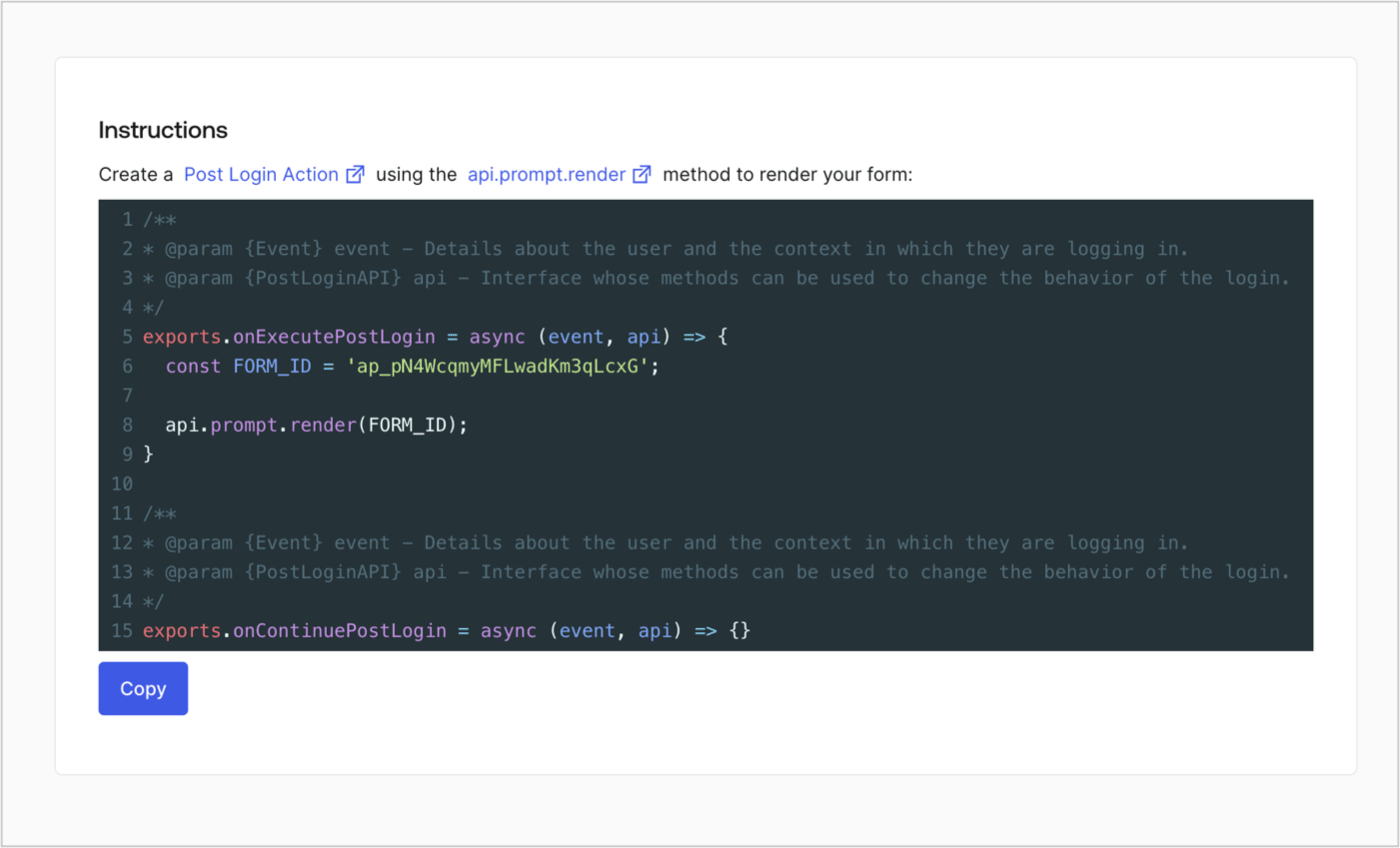
Retrieve your form render code to visually render the form with a custom Post Login Action by following these steps:

* From the Form editor, select **`<> Render`**.
* Select **Copy**.
<Frame>
  <img src="https://mintcdn.com/docs-staging-docs-event-stream-action-templates/jIClKhhRxa2ZEcOk/docs/images/cdy7uua7fh8z/2EIUzc539sq9lwoTKbjoJv/496a864c0fc44a782c9cadca119dbfb0/embed.png?fit=max&auto=format&n=jIClKhhRxa2ZEcOk&q=85&s=a71540b6741b575a5bcc1dafbc72f124" alt="Dashboard > Actions > Forms > Form > Embed" data-og-width="1400" width="1400" data-og-height="848" height="848" data-path="docs/images/cdy7uua7fh8z/2EIUzc539sq9lwoTKbjoJv/496a864c0fc44a782c9cadca119dbfb0/embed.png" data-optimize="true" data-opv="3" srcset="https://mintcdn.com/docs-staging-docs-event-stream-action-templates/jIClKhhRxa2ZEcOk/docs/images/cdy7uua7fh8z/2EIUzc539sq9lwoTKbjoJv/496a864c0fc44a782c9cadca119dbfb0/embed.png?w=280&fit=max&auto=format&n=jIClKhhRxa2ZEcOk&q=85&s=1811e055b3360d7c805b4df9ccfa0daa 280w, https://mintcdn.com/docs-staging-docs-event-stream-action-templates/jIClKhhRxa2ZEcOk/docs/images/cdy7uua7fh8z/2EIUzc539sq9lwoTKbjoJv/496a864c0fc44a782c9cadca119dbfb0/embed.png?w=560&fit=max&auto=format&n=jIClKhhRxa2ZEcOk&q=85&s=df3e091724b09e3a778553626fea3a5d 560w, https://mintcdn.com/docs-staging-docs-event-stream-action-templates/jIClKhhRxa2ZEcOk/docs/images/cdy7uua7fh8z/2EIUzc539sq9lwoTKbjoJv/496a864c0fc44a782c9cadca119dbfb0/embed.png?w=840&fit=max&auto=format&n=jIClKhhRxa2ZEcOk&q=85&s=c916ad5170c31ad9509c34095941286d 840w, https://mintcdn.com/docs-staging-docs-event-stream-action-templates/jIClKhhRxa2ZEcOk/docs/images/cdy7uua7fh8z/2EIUzc539sq9lwoTKbjoJv/496a864c0fc44a782c9cadca119dbfb0/embed.png?w=1100&fit=max&auto=format&n=jIClKhhRxa2ZEcOk&q=85&s=74f5c2ac71bd01cf994f7175ab422d42 1100w, https://mintcdn.com/docs-staging-docs-event-stream-action-templates/jIClKhhRxa2ZEcOk/docs/images/cdy7uua7fh8z/2EIUzc539sq9lwoTKbjoJv/496a864c0fc44a782c9cadca119dbfb0/embed.png?w=1650&fit=max&auto=format&n=jIClKhhRxa2ZEcOk&q=85&s=bb2829243e9ac391119f9d7f4702640f 1650w, https://mintcdn.com/docs-staging-docs-event-stream-action-templates/jIClKhhRxa2ZEcOk/docs/images/cdy7uua7fh8z/2EIUzc539sq9lwoTKbjoJv/496a864c0fc44a782c9cadca119dbfb0/embed.png?w=2500&fit=max&auto=format&n=jIClKhhRxa2ZEcOk&q=85&s=d2439a5949ea683ec2c320ad8f63c72d 2500w" />
</Frame>

## Create a Post Login Action

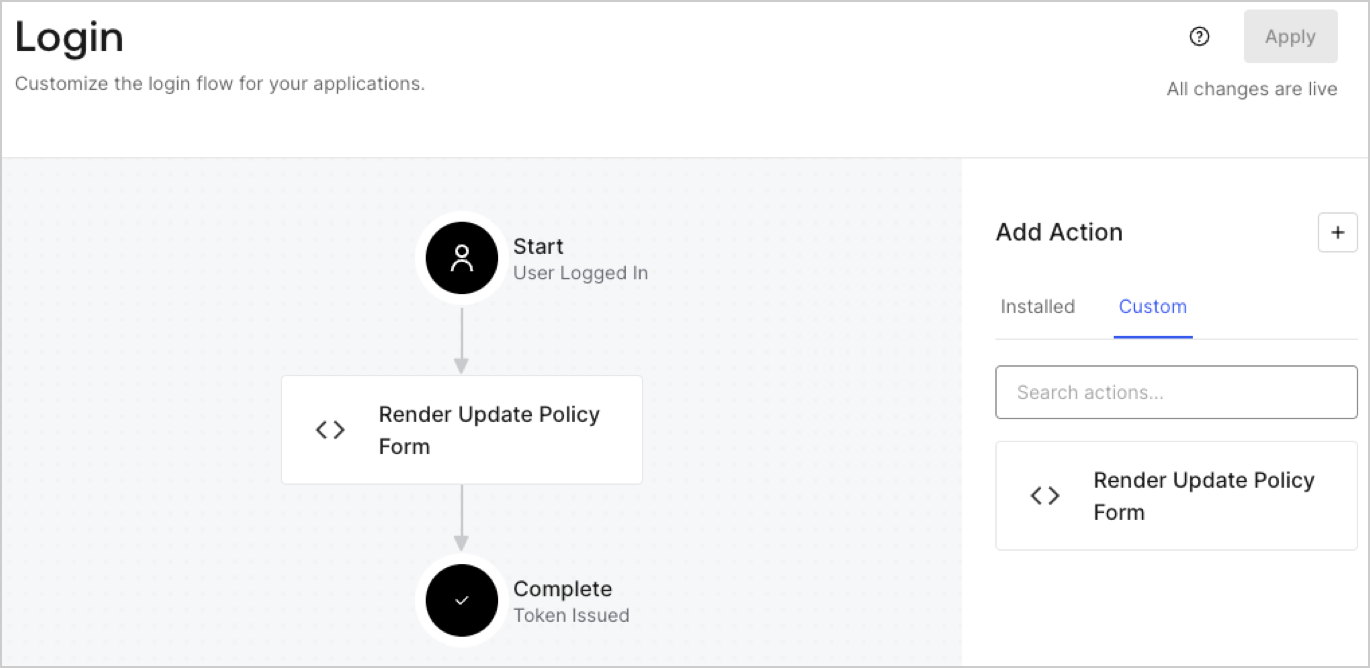
Create a post-login Action to render your form by following these steps:

1. Navigate to **Auth0 Dashboard > Actions > Flows > Login.**
2. Select the **+** icon and Select **Build from scratch**:

   * **Name**: Enter `Render Update Policy Form`.
   * **Trigger**: Select `Login / Post Login`.
   * **Runtime**: Select the recommended version.
3. Select **Create**.

To configure the post-login Action:

1. Delete the existing code from the Code editor.
2. Paste the form render code into the Code editor.
3. Edit the code to define the conditional logic that will render the form.

   ```javascript lines theme={null}
   /**
   * @param {Event} event - Details about the user and the context in which they are logging in.
   * @param {PostLoginAPI} api - Interface whose methods can be used to change the behavior of the login.
   */
   exports.onExecutePostLogin = async (event, api) => {
     const FORM_ID = 'REPLACE_WITH_YOUR_FORM_ID';

     if (event.user.app_metadata.privacy_policies !== true) {
       api.prompt.render(FORM_ID);
     }
   }

   exports.onContinuePostLogin = async (event, api) => { }
   ```

   <Callout icon="file-lines" color="#0EA5E9" iconType="regular">
     The example code above will render the form when a user is missing the app metadata `privacy_policies` property.
   </Callout>
4. Select **Deploy.**
5. Drag and Drop the **Render Update Policy Form** Action to the **Login** flow.
   <Frame>
     <img src="https://mintcdn.com/docs-staging-docs-event-stream-action-templates/1hRtDTIU3j1_StEt/docs/images/cdy7uua7fh8z/5TOwDgevZsBqd7yZynUYWU/41ca909dc3007aed4f40ff794a05efa5/postlogin.png?fit=max&auto=format&n=1hRtDTIU3j1_StEt&q=85&s=faaf2d33bdf8e27080b6bc8b77a9248c" alt="Dashboard > Forms > Use Case > Render update policy form login action" data-og-width="1370" width="1370" data-og-height="668" height="668" data-path="docs/images/cdy7uua7fh8z/5TOwDgevZsBqd7yZynUYWU/41ca909dc3007aed4f40ff794a05efa5/postlogin.png" data-optimize="true" data-opv="3" srcset="https://mintcdn.com/docs-staging-docs-event-stream-action-templates/1hRtDTIU3j1_StEt/docs/images/cdy7uua7fh8z/5TOwDgevZsBqd7yZynUYWU/41ca909dc3007aed4f40ff794a05efa5/postlogin.png?w=280&fit=max&auto=format&n=1hRtDTIU3j1_StEt&q=85&s=e88f4a56e12fe480c5438cd19a0f326b 280w, https://mintcdn.com/docs-staging-docs-event-stream-action-templates/1hRtDTIU3j1_StEt/docs/images/cdy7uua7fh8z/5TOwDgevZsBqd7yZynUYWU/41ca909dc3007aed4f40ff794a05efa5/postlogin.png?w=560&fit=max&auto=format&n=1hRtDTIU3j1_StEt&q=85&s=5f32274d1e64fe8d1e26e0d4e237d2e1 560w, https://mintcdn.com/docs-staging-docs-event-stream-action-templates/1hRtDTIU3j1_StEt/docs/images/cdy7uua7fh8z/5TOwDgevZsBqd7yZynUYWU/41ca909dc3007aed4f40ff794a05efa5/postlogin.png?w=840&fit=max&auto=format&n=1hRtDTIU3j1_StEt&q=85&s=da2339c6f34a20caf0d5a84d0436f5ef 840w, https://mintcdn.com/docs-staging-docs-event-stream-action-templates/1hRtDTIU3j1_StEt/docs/images/cdy7uua7fh8z/5TOwDgevZsBqd7yZynUYWU/41ca909dc3007aed4f40ff794a05efa5/postlogin.png?w=1100&fit=max&auto=format&n=1hRtDTIU3j1_StEt&q=85&s=303d0f65e51b27adb1c241609b107006 1100w, https://mintcdn.com/docs-staging-docs-event-stream-action-templates/1hRtDTIU3j1_StEt/docs/images/cdy7uua7fh8z/5TOwDgevZsBqd7yZynUYWU/41ca909dc3007aed4f40ff794a05efa5/postlogin.png?w=1650&fit=max&auto=format&n=1hRtDTIU3j1_StEt&q=85&s=e5c5d20e6f7b3034be98e331f56a2321 1650w, https://mintcdn.com/docs-staging-docs-event-stream-action-templates/1hRtDTIU3j1_StEt/docs/images/cdy7uua7fh8z/5TOwDgevZsBqd7yZynUYWU/41ca909dc3007aed4f40ff794a05efa5/postlogin.png?w=2500&fit=max&auto=format&n=1hRtDTIU3j1_StEt&q=85&s=d30f940017473c151fe3e5572b861b92 2500w" />
   </Frame>
6. Select **Apply.**

### Test implementation

Test the implementation by following these steps:

1. Log in with an existing user whose app`_metadata` attribute `privacy_policies` does not have a value.
2. The post-login Action in the Login flow will render the form and prompt for acceptance.
3. Select **Auth0 Dashboard > User Management > Users,** locate the user and verify that the `app_metadata` attribute `privacy_policies` contains a `true` value and a timestamp.
